Graph Plotter for Interactive Mathematical Graphing
Use the Graph Plotter to create and compare mathematical graphs interactively. Ideal for plotting functions, inequalities, and piecewise graphs on a Cartesian plane with dynamic features for teaching.
Want to teach with this content in Prezuva Slide?
Prezuva — Create, Teach, Engage, Assess
Try for free →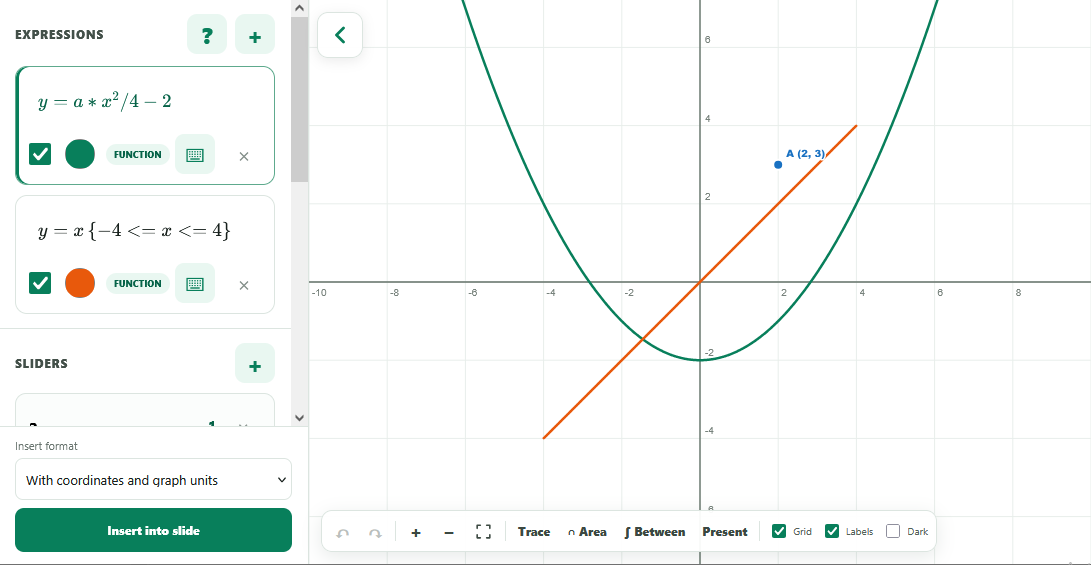
For individual learning only. Use for classroom teaching or commercial purposes is not permitted.
About this classroom tool
The Graph Plotter is an interactive classroom tool designed to help teachers and students explore mathematical graphs on a Cartesian plane. It supports plotting explicit functions, implicit relations, inequalities, restricted domains, and piecewise functions, making it versatile for a wide range of mathematical topics.
Users can enter equations via a visual maths editor and add labelled coordinates from point tables. Dynamic features such as parameter sliders, tracing, key-point analysis, intersection shading, and multiple area-between-curves regions enhance visual understanding and make it ideal for smartboard demonstrations.
Key concepts
- Cartesian plane — a two-dimensional coordinate system used to plot points, lines, and curves.
- Functions and relations — mathematical expressions that define relationships between variables, including explicit and implicit forms.
- Parameter sliders — interactive controls that allow dynamic adjustment of function parameters to observe changes in graphs.
- Piecewise functions — functions defined by different expressions over various intervals.
- Key-point analysis — identifying important points such as intercepts, maxima, minima, and intersections on graphs.
Using it in the classroom
- Use as a starter activity by plotting simple linear or quadratic functions to review prior knowledge.
- Demonstrate complex concepts like inequalities and piecewise functions with real-time graph changes on a smartboard.
- Encourage students to explore parameter sliders to understand how changing coefficients affects graph shape and position.
- Assign graph plotting tasks for homework to reinforce understanding of coordinate geometry and function behaviour.
- Use key-point analysis and intersection shading to support assessment for learning during lessons.
Frequently asked questions
Can I plot multiple functions at once?
Yes, the Graph Plotter allows multiple graphs to be displayed simultaneously for comparison and analysis.
Is it possible to graph inequalities and restricted domains?
Yes, the tool supports plotting inequalities and restricting domains to focus on specific regions of a graph.
How can parameter sliders help in understanding graphs?
Parameter sliders enable dynamic manipulation of function parameters, helping students visualise how changes affect the graph's shape and position.
Can I add labelled points to the graph?
Yes, labelled coordinates can be added from a point table to highlight important points on the graph.